VIDEO ANALYSIS, MADE SIMPLE, CHEAP, AND EASY.
Film review made simple. Now for everyone!
Break down video, draw your ideas, track movement, create clips, and teach with clarity. (Cheaper than ever before!)
No credit card required.
Open your film
Your film. Ready when you are.
Open a video and get straight to work. Use video files from your device, or review compatible online sources right in the browser.
Drop a video file
or paste a link to review online
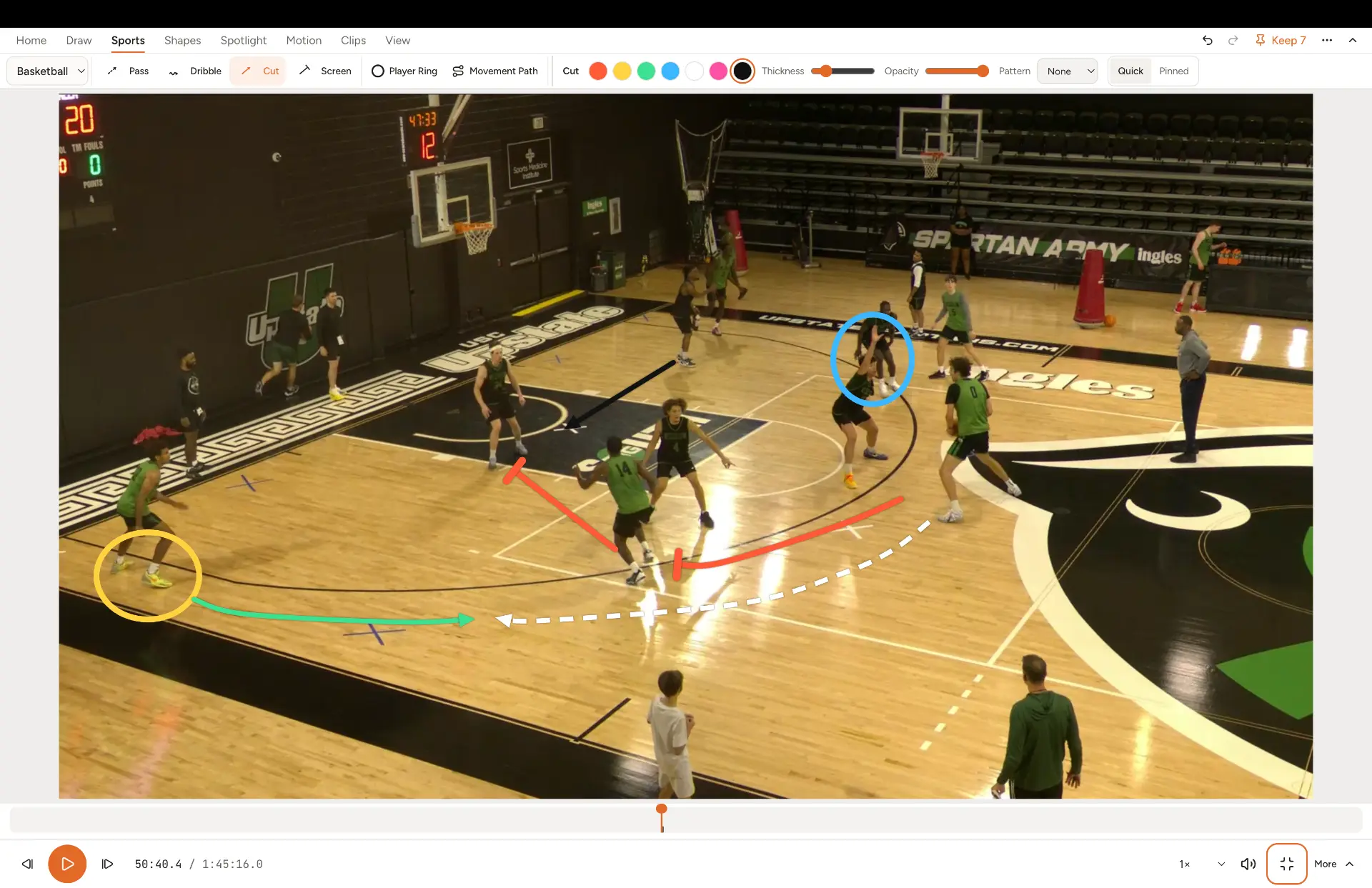
Draw what you see
Show it. Don't just say it.
Arrows, shapes, highlights, and spotlights make every teaching moment clearer.
Bring movement to life
Make every movement make sense.
Follow the action with simple, intuitive motion tools. Click a player, advance the video, and your spotlight or ring follows along.
Capture the moment
The moments that matter. Saved.
Create clips and share what your team needs to see. Export annotated video right from your browser.
Present with confidence
Make your points. Beautifully.
Turn film sessions into clear, engaging teaching experiences with a dedicated view for your audience.
Sports
Built for every sport you coach.
Pick your sport and get tools that speak its language: pass, cut, and screen lines for basketball, routes and blocks for football, and universal arrows for any sport. More sports are on the way, too!
Pricing
Powerful tools. Finally within reach.
Real film analysis shouldn't require a professional team's budget.
Limited-time offer: sign up now for FREE access.
Free
Get straight to local film review.
FREE/mo
Limited time — sign up now
Video & Playback
- Step Backward: Jump back frames or seconds to rewatch a play.
- Local Video: Open game film straight from your computer, never uploaded.
- Frame-by-Frame Stepping: Step through supported MP4 and WebM files frame by frame.
- Playback Speed: Slow down or speed up film while you review.
Drawing & Analysis
- Drawing Tools: Pens, arrows, circles, boxes and text right on the film.
- Coaching Lines: Pass, dribble, cut and screen lines drawn like a whiteboard.
- Tactical Shapes: Draw zones, polygons and curved arrows to show spacing.
- Quick Drawings: Sketch temporary marks that clear when play resumes.
- Pinned Drawings: Keep drawings at exact moments so they reappear on replay.
Motion & Spotlights
- Halo Spotlight: Highlight a player while dimming the rest of the frame.
- Guided Motion: Make drawings follow a player by clicking as film advances.
Clips & Export
- Playlists: Arrange clips into a teaching sequence for meetings.
- Annotated Video Export: Save a video file with your pinned drawings included.
- Clips: Cut key plays without copying or changing your original film.
Presentation
- Presentation View: Show film full-screen with clean, distraction-free controls.
- Audience Window: Show players a second screen while you control and draw.
Projects & Storage
- Saved Projects: Your drawings and clips save automatically on this device.
Coach
Most popularYour complete coaching toolkit.
FREE/mo
Limited time — sign up now
Video & Playback
- Step Backward: Jump back frames or seconds to rewatch a play.
- Local Video: Open game film straight from your computer, never uploaded.
- Frame-by-Frame Stepping: Step through supported MP4 and WebM files frame by frame.
- Playback Speed: Slow down or speed up film while you review.
Drawing & Analysis
- Drawing Tools: Pens, arrows, circles, boxes and text right on the film.
- Coaching Lines: Pass, dribble, cut and screen lines drawn like a whiteboard.
- Tactical Shapes: Draw zones, polygons and curved arrows to show spacing.
- Quick Drawings: Sketch temporary marks that clear when play resumes.
- Pinned Drawings: Keep drawings at exact moments so they reappear on replay.
Motion & Spotlights
- Halo Spotlight: Highlight a player while dimming the rest of the frame.
- Guided Motion: Make drawings follow a player by clicking as film advances.
Clips & Export
- Playlists: Arrange clips into a teaching sequence for meetings.
- Annotated Video Export: Save a video file with your pinned drawings included.
- Clips: Cut key plays without copying or changing your original film.
Presentation
- Presentation View: Show film full-screen with clean, distraction-free controls.
- Audience Window: Show players a second screen while you control and draw.
Projects & Storage
- Saved Projects: Your drawings and clips save automatically on this device.
Program
Film review across your program.
FREE/mo
Limited time — sign up now
Video & Playback
- Step Backward: Jump back frames or seconds to rewatch a play.
- Local Video: Open game film straight from your computer, never uploaded.
- Frame-by-Frame Stepping: Step through supported MP4 and WebM files frame by frame.
- Playback Speed: Slow down or speed up film while you review.
Drawing & Analysis
- Drawing Tools: Pens, arrows, circles, boxes and text right on the film.
- Coaching Lines: Pass, dribble, cut and screen lines drawn like a whiteboard.
- Tactical Shapes: Draw zones, polygons and curved arrows to show spacing.
- Quick Drawings: Sketch temporary marks that clear when play resumes.
- Pinned Drawings: Keep drawings at exact moments so they reappear on replay.
Motion & Spotlights
- Halo Spotlight: Highlight a player while dimming the rest of the frame.
- Guided Motion: Make drawings follow a player by clicking as film advances.
Clips & Export
- Playlists: Arrange clips into a teaching sequence for meetings.
- Annotated Video Export: Save a video file with your pinned drawings included.
- Clips: Cut key plays without copying or changing your original film.
Presentation
- Presentation View: Show film full-screen with clean, distraction-free controls.
- Audience Window: Show players a second screen while you control and draw.
Projects & Storage
- Saved Projects: Your drawings and clips save automatically on this device.
Limited-time offer: sign up now for FREE access. Your film always stays on your device.
Ready to help your team see the game differently?
Savings calculator
Your budget could go a lot further.
See how much of your current software budget Film Room puts back in your pocket.
That works out to $1,000 a year.
Film Room costs you
FREE
for coaches who sign up now
That's $1,000 a year back in your program.
Limited-time offer: sign up now for FREE access. Competitors differ in features, support, storage, and user limits. This is a financial cost comparison, not a claim of feature-for-feature equivalence.
Put your budget to better use.